The best audio interface for streaming, and the honest answer about whether you need one
By Elan Harpaz · Published 2026-09-08
A USB mic needs no interface. An XLR mic does, and the right one depends on whether you want a monitor mix and a mute button. Picks from $50 to $180 with the catch on each.
Your encoder tops out at 1080p60. A higher-end encoder would go further.
Buy links are affiliate links: we earn a commission at no extra cost to you. Prices are tracked estimates, not live prices. Full disclosure
| Component | Pick | Price | |
|---|---|---|---|
| Camera | Elgato Facecam MK.2 Premium Full HD face cam built for streaming, with a true 1080p60 sensor. Buy on Amazon | $109.99 | Buy on Amazon |
| Audio | Shure SM7B The broadcast standard. Rich, broadcast-grade voice that big streamers run. Buy on Amazon | $439 | Buy on Amazon |
| Interface / Mixer | Elgato Wave XLR Single-mic XLR interface with a capacitive mute and onboard mixing. Clean and simple. Buy on Amazon | $160 | Buy on Amazon |
| Mic Arm | RODE PSA1+ Smooth, sturdy studio boom arm with internal cable management. Buy on Amazon | $112 | Buy on Amazon |
| Software | OBS Studio Free, open-source broadcast software. On a PC it is also your encoder, up to 4K with a decent GPU. Learn more | Free | Learn more |
You need an audio interface for streaming only if your microphone has an XLR plug on the end of it. A USB mic like the Shure MV7 or a FIFINE dynamic already has the interface built in, so adding a box changes nothing. Once you do go XLR, the best interface for a streamer is a single-input unit with a big gain knob, a physical mute, and a headphone output that mixes your mic with the PC, which is what the Elgato Wave XLR does for about $160 and the Focusrite Scarlett Solo does for a little less without the mute.
The decision in one paragraph
Count the microphones. One XLR mic and a pair of headphones: a one-input interface, and the ones below all fit. A mic plus a guest, an instrument, or a second mic for a co-host: a two-input Scarlett 2i2 or MiniFuse 2. A dynamic mic like the SM7B or PodMic that needs a lot of gain: either an interface with 60 dB or more of clean gain, or a Cloudlifter in front of a cheaper one. A whole mixing console with faders for Discord, game and music: that is a GoXLR or a RODECaster, which is a different price class and mostly a different problem.
| Behringer UMC22 | Scarlett Solo (4th Gen) | Elgato Wave XLR | GoXLR Mini | |
|---|---|---|---|---|
| XLR inputs | 1 | 1 | 1 | 1 |
| Gain for an SM7B | No (add a Cloudlifter) | Yes, with Air mode | Yes, 75 dB | Yes |
| Physical mute | ||||
| Monitor mix in hardware | Direct monitor switch | Direct monitor switch | Wave Link software | Four faders |
| Best for | A first XLR mic on a budget | Music too | Streaming only | Mixing Discord and game live |

Built for exactly this job: one knob, a capacitive mute, a clipguard that stops a shout from distorting, and Wave Link to build a stream mix and a headphone mix separately.

The most-bought interface on earth, with enough gain now for a dynamic mic. Better than the Wave XLR if you also record music.
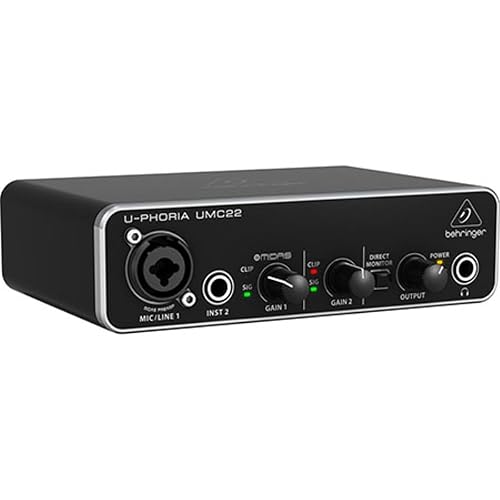
The cheapest honest way to plug in an XLR mic. Fine with a condenser or a loud dynamic, short of gain for an SM7B without help.

Twenty-five decibels of clean gain from phantom power. What turns a cheap interface plus an SM7B into a usable pair.

When the problem is balancing Discord, game and music live, faders beat a mouse. Windows only.

The Volt 176 adds a real analog compressor on the input, which means your voice arrives at OBS already levelled. The audiophile pick among the one-input boxes.
Set up the monitor mix, whichever one you buy
- Route the interface mic to OBS as its own track, not through Windows default input, so game audio never rides on it.
- Turn on direct monitoring or a Wave Link monitor mix so you hear yourself with zero delay. Hearing yourself through OBS adds latency that makes you shout.
- Set gain so normal talking peaks around minus 12 dB in OBS. A compressor after that does the rest.
Frequently asked
Do I need an audio interface to stream?
Not with a USB microphone. Only an XLR microphone needs one, because the interface is the thing that turns the analog signal into USB.
What audio interface works with the Shure SM7B?
One with at least 60 dB of clean gain: the Elgato Wave XLR, the 4th Gen Scarlett Solo, or the UA Volt 176. With a cheaper interface, add a Cloudlifter between the mic and the box.
Is a GoXLR better than an audio interface?
It is an interface with a mixer on top. If you constantly adjust Discord against game audio during the stream, the faders earn their price. If you just talk, a Wave XLR does the job for less.
About this guide. Written by Elan Harpaz. We do not lab-test hardware. Every quality verdict on this page is a planning budget computed from a published model, and every price is a tracked estimate rather than a live one. How the numbers are derived: methodology. How picks are chosen: editorial policy.
Build on this in the configurator